MagSafe Magnetic Ring Holder for iPhone 15 Pro Max & 14
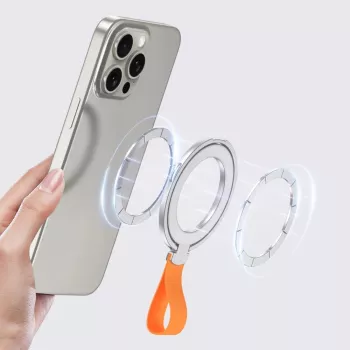
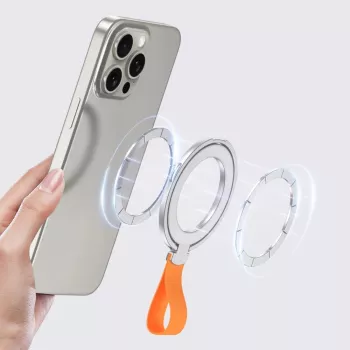
Magnetic Phone Ring Holder for MagSafe iPhone 15 Pro Max & 14: A Grip and Stand That Moves With You
A MagSafe ring holder adds a secure grip for one-handed use and a quick kickstand for video calls, scrolling, and streaming—without permanently sticking anything to the phone. This guide covers how a magnetic ring holder works, what to expect on iPhone 15 Pro Max and iPhone 14 models, and how to get the most stable hold with cases and daily use.
What a MagSafe magnetic ring holder changes in everyday use
Bigger iPhones deliver amazing screens and battery life, but they can feel top-heavy when you’re juggling bags, coffee, or a commute. A magnetic ring holder gives your hand a predictable anchor point that makes daily handling feel calmer and more controlled.
- Adds a confident hold for larger phones during commuting, errands, and one-handed typing.
- Helps reduce drops by giving fingers a fixed contact point instead of relying on a slippery edge grip.
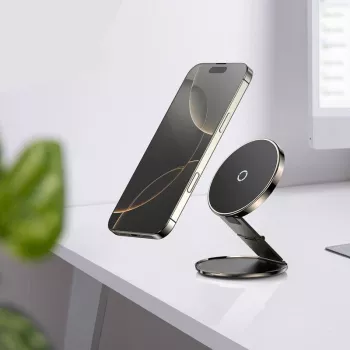
- Doubles as a stand for quick content viewing on a desk, café table, or airplane tray.
- Repositions or removes easily because the attachment is magnetic rather than adhesive.
If you like keeping your phone “clean” (no residue, no permanent mount), a MagSafe-compatible ring holder is one of the simplest upgrades that still feels reversible.
Compatibility with iPhone 15 Pro Max and iPhone 14 series
MagSafe-compatible iPhones have a magnet array that helps accessories snap into a centered position. For the most consistent experience, attach the ring holder directly to a MagSafe iPhone back or to a case that includes a MagSafe magnet ring.
- Designed to align with MagSafe magnets on compatible iPhones for a centered hold.
- Works best when attached directly to a MagSafe-compatible phone case or the phone’s MagSafe back.
- Non-MagSafe cases can reduce magnetic strength and increase wobble—especially with thicker materials.
- If a case has a metal plate, card holder, or extra magnetic accessory already attached, expect weaker alignment and less stability.
Quick compatibility and performance checklist
| Setup | Grip strength | Stand stability | Notes |
|---|---|---|---|
| Bare MagSafe iPhone | Strong | Stable | Most consistent alignment |
| MagSafe-compatible case | Strong | Stable | Best everyday option for protection + hold |
| Thick non-MagSafe case | Medium to weak | Less stable | May slip or rotate under pressure |
| Case with metal plate or wallet | Weak | Unstable | Magnets can be disrupted; remove conflicting accessories |
For background on how the ecosystem is designed to snap into place, see Apple’s MagSafe overview. If you’re comparing charging ecosystems, Qi2 from the Wireless Power Consortium provides helpful context on magnetic alignment standards.
Grip modes and stand positions that feel stable
A ring holder isn’t just “on” or “off.” Small adjustments to how you hold it can make a Pro Max-size phone feel significantly lighter and easier to control.
- Ring grip: place an index finger through the ring for a secure hold while the thumb scrolls.
- Two-finger support: use the ring as a brace while taking photos or filming on the go.
- Kickstand portrait: useful for video calls, reading, and social apps.
- Kickstand landscape: better for streaming, recipes, and watching on a desk.
- Best stability: keep the magnetic ring centered and avoid partial overlap on the MagSafe ring.
If the phone feels like it “wants to rotate,” it’s usually a centering issue (slightly off the magnet ring) or a case issue (thickness or lack of MagSafe magnets).
How to attach it for maximum magnetic hold
Magnetic accessories feel strongest when the surfaces are clean and the magnets can fully seat into alignment. A quick setup check takes seconds and can prevent a lot of annoyance later.
- Clean first: wipe the back of the phone/case to remove dust and oils before placement.
- Let the magnets self-center: bring the accessory close and allow it to snap into alignment.
- Test rotation: gently twist to confirm it resists spinning before relying on it for one-hand use.
- Avoid stacking: keep other MagSafe accessories off the back when using the ring to prevent misalignment.
- Confirm your case: if it’s not MagSafe-compatible, expect reduced performance and more wobble.
Once it’s aligned, the best day-to-day habit is simple: re-check the seat after pulling the phone out of a tight pocket or bag, where fabric pressure can sometimes nudge accessories.
Comfort and safety tips for larger phones
On heavier models like the iPhone 15 Pro Max, a ring holder can make long sessions more comfortable—if you place it thoughtfully.
For magnet-related safety guidance, refer to Apple’s iPhone Important Safety Information.
Care, durability, and when to replace
Good add-ons for a desk-and-go setup
Shop compatible accessories
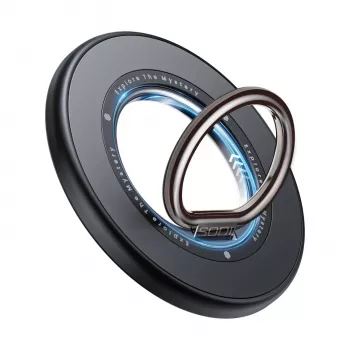
- Magnetic Phone Ring Holder for MagSafe iPhone 15 Pro Max & 14 Grip Stand — a simple magnetic grip and kickstand solution for MagSafe setups.
- Silver Aluminum Laptop Stand — a sturdy way to raise your screen and keep your desk setup comfortable.
FAQ
Will a magnetic ring holder work through a phone case?
Yes, if the case is MagSafe-compatible and has a built-in magnet ring. Thick or non-MagSafe cases can weaken the hold and make the stand less stable.
Can it be used as a stand in both portrait and landscape?
Most magnetic ring holders can support both orientations depending on ring angle and surface friction. Stability is best when the accessory is centered on the MagSafe ring.
Is it safe to use MagSafe magnets around bank cards or medical devices?
Magnets can affect magnetic stripe cards and some medical devices, so it’s best to follow Apple guidance and the device manufacturer’s instructions. Avoid close contact when advised and don’t store cards directly against magnetic accessories.







Leave a comment