Can iPad Stylus Pens Work on iPhone? What Actually Works

Do iPad stylus pens work on iPhones?
It depends on the type of stylus. Most iPad-specific “active” pens—especially Apple Pencil models—do not work on iPhones because iPhones don’t have the same Apple Pencil digitizer hardware that iPads use. If you try pairing an Apple Pencil to an iPhone, it won’t connect, and even if it charges (on compatible hardware), it still won’t write on the screen.
Why Apple Pencil works on iPad but not iPhone
Apple Pencil relies on a dedicated sensor layer built into supported iPad screens to detect pressure, tilt, palm rejection, and low-latency input. iPhones are designed for finger touch input and don’t include the Apple Pencil sensor technology. That’s why an Apple Pencil can’t deliver its signature features—or any pen input at all—on an iPhone.
What stylus options do work on iPhone?
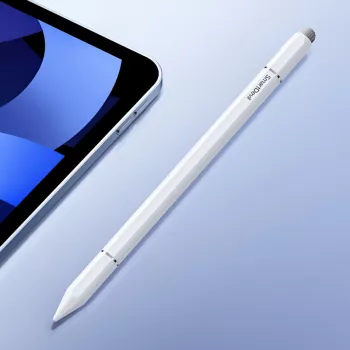
If you want a pen for iPhone, look for a capacitive stylus. These are the universal rubber-tip or disc-tip styluses that mimic a fingertip, so they’ll register on virtually any touchscreen phone. Some “active capacitive” styluses may offer a finer tip or better feel, but they still won’t add true pressure sensitivity on iPhone the way Apple Pencil does on iPad.
How to choose the right stylus for your device
Before buying, check whether the stylus is listed as Apple Pencil-compatible (iPad-only) or universal capacitive (iPhone-friendly). If your goal is quick tapping, swiping, signing, or basic sketching on an iPhone, a good capacitive stylus is usually the simplest pick. For more detailed drawing or note-taking, an iPad paired with Apple Pencil is the better match.
For model-by-model details and compatibility tips, see the full guide here: https://stunningofferingclub.shop/do-ipad-stylus-pens-work-on-iphones/.
FAQ
Will a capacitive stylus work on any iPhone model?
Yes. A basic capacitive stylus works on essentially all iPhone models because it functions like a finger touch, without needing Bluetooth pairing or special screen hardware.








Leave a comment